
Benzinga Financial News & Data
BenzingaFinance
4.4142.00 Reviews
- Version
- 3.5.11
- Installs
- 100.00K
- Age Rating
- Everyone 10+
Screenshots

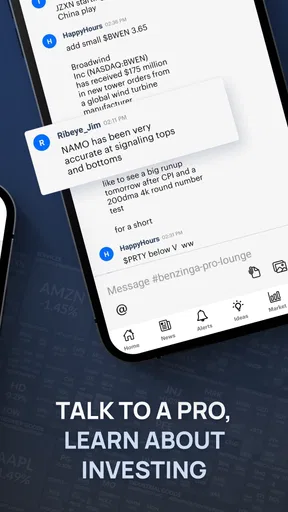
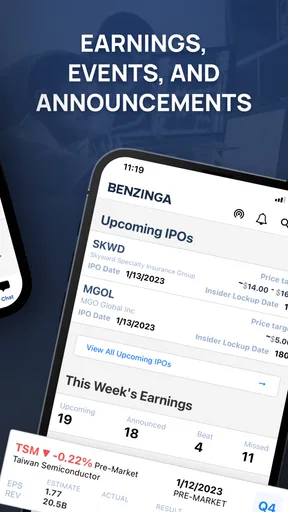
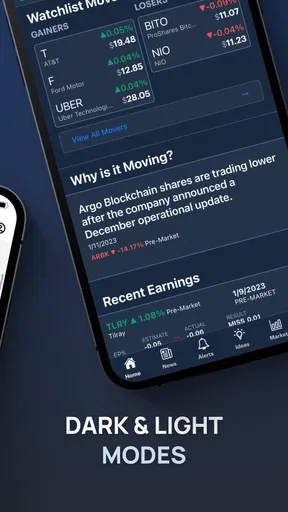
Our Review of Benzinga Financial News & Data
 Analysis by Appyee
I often check market headlines between ordinary tasks, and that habit gets awkward when several people share a phone or tablet. One person may want a quick look at a company story while another is trying to follow broader market news. Benzinga Financial News & Data is built around financial coverage and market information, so it can be useful in a household where investing is a shared topic. I would still treat it as a personal reading tool rather than a shared family dashboard: separate readers should be clear about whose watchlist, alerts, and decisions they are looking at.
A quick check without turning it into a research session
A realistic use for me is checking headlines during breakfast before deciding whether anything deserves a closer look later. I can scan the feed, notice a company or market development, and save the deeper reading for a quieter moment. That is a better fit than trying to make an investment decision from a short alert while distracted. Financial news gives context; it does not replace checking a company’s filings, understanding risk, or deciding whether a trade suits your circumstances.
The app is a finance product from Benzinga, and its focus makes most sense for people who already follow markets or want to build a regular news-reading habit. It has a 4.4 average from around 3.2 thousand ratings, with over 100 thousand installs. Those figures suggest a substantial audience, but they do not tell me whether its particular mix of coverage suits an individual reader. I would judge that by whether the stories and market information I care about are easy to find and worth returning to.
Setting boundaries on a shared device
On a device used by more than one person, I would make a simple distinction between browsing and acting. A parent or partner might open the app to read a headline, while the person who owns an investment account handles any financial decisions elsewhere. I would not assume that a shared device makes watchlists or notifications private. Before enabling alerts or saving personal interests, check who can access the device and what appears on its screen.
This is especially useful if you only want the app for reading. You can keep a conversation about the news separate from a conversation about a household portfolio, which avoids treating one person’s interests as everyone’s. If several adults use the same phone, agreeing on a routine—such as opening the app only for a quick news check and not changing another person’s settings—can prevent confusion. That is a household habit, not a special family feature.
For coordination, I would share the article or the key point in conversation rather than asking everyone to monitor the same stream. A headline can prompt a useful discussion, but different readers may interpret its importance differently. If two people follow the same company, compare what each has read and check the publication context before drawing a conclusion. That small step is more dependable than assuming everyone has seen the same alert at the same time.
Who will get the most from it
I see the strongest fit for readers who want financial headlines and market-related information close at hand, especially people who already know which sectors, companies, or themes they want to follow. It may also help a curious beginner get into the routine of checking the news, provided they approach analysis as background rather than a ready-made recommendation. For someone who only wants a broad summary of the day, a general news app may be less demanding; for someone who wants to track personal spending or household bills, a budgeting app is the more relevant tool.
The app is free to download, though it offers in-app purchases ranging from $2.99 to $299.99 per item. I would start with the free experience and decide whether the available coverage meets my needs before paying for anything. A high-priced purchase is not automatically worthwhile just because markets matter to you; compare what it adds with the specific information you actually use. If you only check headlines occasionally, a paid option may not make sense.
It is also worth remembering that financial information can be noisy. More alerts do not necessarily mean better awareness, and frequent updates can encourage a reader to react to every price movement. I would keep notifications selective and use the app at chosen moments rather than letting it interrupt the day. If a notification makes you anxious or pushes you toward rushed trades, turning it off is a sensible boundary, not a failure to use the product properly.
Age, trust, and informed reading
The content rating is Everyone 10+, which is a useful age-context signal for households, but I would not take that as a reason to hand a child responsibility for financial decisions. Market stories can involve risk, uncertainty, and unfamiliar language. A younger reader may benefit from discussing what a headline means with an adult, especially where it concerns investment choices. The app can support learning about financial news, but a rating does not replace guidance or judgment.
For trust, I try to separate a news report from an interpretation or a forecast. When a story sounds decisive, I look at what it actually describes and whether it is reporting an event, explaining a trend, or offering an opinion. That distinction matters in any market-news app, and it is particularly important when a household member relays a headline secondhand. A concise summary can be a starting point, not the whole case for an investment.
On Android, the current version is 3.5.11 and the minimum operating-system requirement is Android 7.0. The app was released on January 28, 2022, and its age rating is Everyone 10+. These practical details matter if you are installing it on an older shared device: check compatibility before planning to use it there. I would also keep the app updated when possible, since using a current release is generally preferable to relying on an old installation.
For iPhone or iPad users, I would check the relevant platform’s current listing and device requirements before choosing it. I would not assume that every screen or feature behaves identically across Android and iOS. More generally, anyone deciding whether to install should consider whether they want an active stream of market material or a calmer, less frequent digest. The former is the point here; the latter may be better served by a newsletter or a general financial publication.
Compared with a brokerage app, a financial-news app has a different job. A broker is where account balances, orders, and investment transactions belong; news is where I look for context. Keeping those roles distinct helps me avoid confusing a striking headline with a reason to trade. Compared with a broad news app, this one is more focused on finance, which can save time for market readers but may feel narrow if you want politics, local coverage, culture, and other topics in the same feed.
There is also a trade-off between a dedicated app and simply searching the web. Search is useful when I know exactly what I want to investigate, while a focused news feed can surface developments I might not have thought to look for. I would use both: browse for awareness, then search for primary details when a story could affect an actual decision. That workflow makes the app more useful without asking it to be the sole authority on a company or market event.
One practical tip is to decide in advance what would make a story relevant to you. If you follow a few companies, use that focus to filter your attention rather than treating every market headline as equally important. Another is to avoid checking during moments when you cannot follow up; a breaking story seen in a queue or during a meeting can create worry without providing time to understand it. Save the question for later, then read with enough attention to distinguish facts from speculation.
People who want automatic financial planning, tax guidance, portfolio management, or transaction tools should look elsewhere for those specific jobs. News and market coverage can inform a plan, but it does not replace a qualified professional or a service designed for managing accounts. Likewise, if you dislike frequent financial headlines or would rather receive a weekly overview, this may not be the most comfortable way to stay informed.
For a household, I would make the installation decision based on who will actually read it, whether the device is shared, and how much interruption everyone is comfortable with. One interested adult may find it handy without needing every family member to use it. If several people want to follow markets, agree on separate interests and avoid treating a shared screen as proof that everyone has the same context. That keeps the app’s role clear and conversations more grounded.
Overall, I would recommend trying it if financial news is a regular part of your day and you want a finance-focused place to check developments. I would skip it if your main need is budgeting, account management, or a quiet general-news experience. The sensible approach is to use the feed as a starting point, keep alerts under control, and verify important claims before acting. In that role, it can fit neatly into a household’s routine without becoming the household’s financial decision-maker.
First Impressions and Interface
Opening up the Benzinga Financial News & Data app, my first thought was, "Wow, this is refreshingly simple!" The interface is clean and straightforward, which is a huge plus in my book. You know how some apps throw a million things at you right from the start? This isn’t one of them. Everything feels well-organized, making it easy to find your way around even if you’re not a tech wizard.
The app’s main screen gives you access to the latest financial news, market updates, and a neat collection of analytical tools. It's like having a mini Bloomberg terminal right in your pocket. The color scheme is quite pleasant, with a professional yet inviting vibe that makes spending time on the app a non-dull experience.
Features Galore
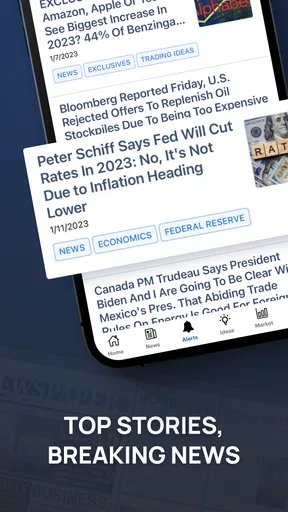
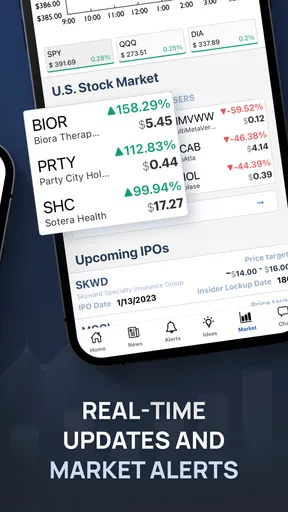
Now, let's dive into what this app offers. One of the standout features is the real-time news feed. It's constantly updated with the latest happenings in the financial world, so you'll never miss a beat. Whether it's stock market updates, economic reports, or company-specific news, it’s all there at your fingertips.
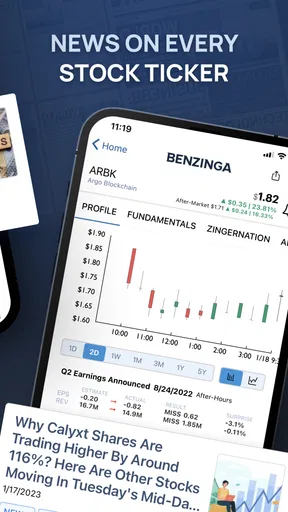
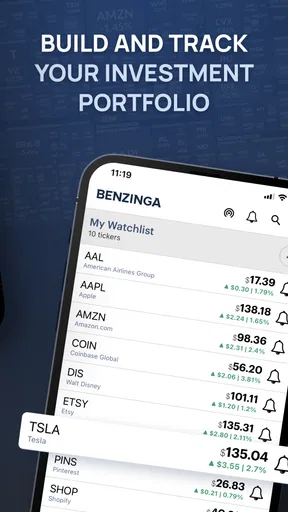
Another nifty feature is the stock tracking capability. You can easily add stocks to your watchlist and get real-time updates. It's perfect for those of us who like to keep a close eye on our investments. Plus, the app provides a detailed analysis of stocks, complete with charts and historical data, making it a fantastic tool for both newbies and seasoned investors.
And let’s not forget the push notifications. They’re customizable, so you can choose to get alerts on only the topics that matter most to you. This means you won't be bombarded with information you don’t need, which is a huge relief!
User Experience and Performance
Performance-wise, the app runs smoothly. I didn’t experience any lags or crashes, which is a big deal when you need real-time data. The loading times are quick, and transitions between different sections of the app are seamless. It’s clear the developers put a lot of thought into making this app user-friendly.
Now, let’s talk about the user experience. Navigating the app feels intuitive. The buttons are well-placed, and the menu options are easy to understand. Even if you're not super tech-savvy, you’ll feel right at home here.
Customization and Personalization
One thing I absolutely love about this app is the level of customization it offers. You can tailor the news feed to focus on specific sectors or topics, ensuring that the content is always relevant to your interests. It’s like having a personalized financial news assistant.
Moreover, the app allows you to set up your dashboard to display the information you find most important. Whether it’s your portfolio, market movers, or top news stories, you can set it up just the way you like it.
Final Thoughts
In conclusion, the app is a must-have for anyone serious about staying informed in the world of finance. Its combination of real-time news, robust stock tracking, and user-friendly interface makes it an invaluable tool for investors at any level.
Whether you’re a finance junkie or just someone who wants to keep an eye on their investments, this app offers a comprehensive solution that doesn’t overwhelm. So, if you’re looking to stay ahead of the financial curve, give Benzinga a try. You might just find it’s exactly what you’ve been looking for.
Verdict
Strengths of Benzinga Financial News & Data
- Comprehensive financial news coverage.
- Real-time market data updates.
- User-friendly interface design.
- Customizable alerts and notifications.
- Integration with stock trading platforms.
Limitations of Benzinga Financial News & Data
- Limited free content access.
- Occasional in-app ad interruptions.
- Some features require subscription.
- Interface can be overwhelming for beginners.
- No offline reading mode available.
Similar Picks in This Category
View All
Google Wallet
Google LLC4.3

Airtel: Recharge, Bank & Loans
Airtel4.0

PayPal - Pay, Send, Save
PayPal Mobile4.2

DANA Indonesia Digital Wallet
PT Espay Debit Indonesia Koe4.5

Binance: Buy Bitcoin & Crypto
Binance Inc.4.8

Cash App
Block, Inc.4.7
Frequently Asked Questions
What features does Benzinga Financial News & Data offer?
Benzinga Financial News & Data provides real-time financial news, market data, and analysis tools. Users can customize news feeds, access stock market insights, and receive alerts on market movements. The app also offers detailed reports and charts to help users make informed investment decisions.
Is Benzinga Financial News & Data suitable for beginners?
Yes, Benzinga is designed for both beginners and experienced investors. It offers a user-friendly interface and educational resources to help newcomers understand financial markets. Additionally, the app provides tools and insights tailored to various levels of investment expertise.
Does Benzinga offer real-time market alerts?
Benzinga provides real-time alerts on market changes, stock price movements, and breaking financial news. Users can customize alerts to track specific stocks, sectors, or market trends, ensuring they stay informed on critical developments as they happen.
Is there a subscription fee for Benzinga Financial News & Data?
Benzinga offers both free and premium subscription plans. The free version provides access to basic features, while the premium plan offers advanced tools, in-depth analysis, and exclusive content. Users can choose a plan based on their investment needs and budget.
Can Benzinga Financial News & Data be accessed on multiple devices?
Yes, Benzinga is available on multiple platforms, including Android and iOS devices. Users can sync their accounts across devices, ensuring they have access to their personalized news feeds, alerts, and data from anywhere, at any time.
